
AI Extract: recovering the forensic record of AI activity
A forensic platform for AI prompt and input activity, built as three programs that share one case format. AI Extract collects and seals the evidence AI assistants leave behind, down to the underlying LSM data stores; the Analysis Workbench turns the sealed container into chains, subjects, and gaps an examiner can interrogate and defend.
AI Extract is a forensic platform for the evidence that AI assistants, coding agents, and local runtimes leave on a Windows, macOS, or Linux system. It is really three programs that share one case format: AI Extract collects and seals evidence into a verifiable container, the Analysis Workbench opens that container, verifies it, and turns the recovered records into events an examiner can interrogate: chains, subjects, and gaps. A small Remote Agent runs on a target machine when the evidence lives somewhere you cannot reach directly.
I built it to close a gap that keeps showing up in AI-related examinations. Most tools read what an app chose to export, which is a cleaned-up version of what actually happened. AI Extract goes to the underlying stores where prompts, completions, and tool activity actually live, and it is honest about exactly what it recovered and how.
At a glance
Three programs, one case
AI Extract collects and seals. The Analysis Workbench verifies and interrogates. A Remote Agent reaches a target you cannot touch directly.
25 version-aware parsers
Plus full LevelDB and IndexedDB LSM decoding, the stores where most tools never look.
Four ways in
A live machine, a directory, a forensic image, or a remote system over mutual TLS.
Hashed at copy time
Every file is SHA-256 hashed as it is collected and sealed into one
verifiable .aex container.
RFC 3161 timestamped
FreeTSA primary, Sectigo failover, leaf certificates pinned by fingerprint.
macOS, Windows, and Linux
v0.2.3. The engine underneath is Rust; each app is a thin Tauri shell around it.
Jump to: AI Extract · Analysis Workbench · Remote collection · Forensic guarantees · A tour of the workspace
 AI Extract
What it reads
The centerpiece is full LevelDB and IndexedDB LSM decoding. AI assistants keep their conversation state in these structures, and most tooling only replays the write-ahead log. AI Extract reads the log, the in-memory tables, and the sorted-string tables in modern and legacy formats, with per-vendor profiles for ChatGPT, Claude, and Gemini, so content that other tools never surface can be recovered.
Around that core sit 25 version-aware parsers: the Windows registry hives (UserAssist, ShellBags, BAM/DAM, AmCache, ShimCache, Uninstall), EVTX, Prefetch, FSEvents, SQLite (including the state stores behind Codex and the VS Code-fork tools like Cursor), plist, JSONL transcripts, Zone.Identifier streams, macOS quarantine attributes, unified-log exports, ESE databases (SRU, Windows Search, WebCache, NTDS), Windows Recall snapshots, memory dumps, and mobile app inventory. A parser claims a collected copy only when it recognizes the format and version. A specific decoder always outranks a generic one, so a Cursor conversation store is read as Cursor, not filed away as a nameless SQLite database.
Honest recovery
Every recovered item carries three quality labels that are tracked independently and never collapsed into one score:
| Label | Values | What it tells you |
|---|---|---|
| Confidence | confirmed, likely, inference | How strongly the record supports the claim it makes |
| Assertion class | observed fact, tool inferred, examiner inference | Who is making that claim |
| Verbatim | true or false | Whether the excerpt is exact recovered text |
Each record also states how much content was recovered: full, partial, metadata-only, or unrecoverable. The pipeline never presents an inference as recovered text, and it never silently skips. An expected-but-missing artifact is itself a finding, and a store that is recognized but cannot be decoded is preserved with its hash and path instead of dropped.
The collection pipeline
Collection is driven by TOML manifests that name evidence categories and the glob patterns that match their source files. Sources are opened read-only and copied through a hashing reader, so every file is SHA-256 hashed at the moment it is copied and entered into an append-only chain-of-custody manifest as the work happens, never batched at the end. An inaccessible source is recorded with its reason, never a silent skip.
There are four ways in: the live machine, a directory, a forensic image, or a
remote system. Live collection now runs on macOS, Windows, and Linux alike.
Image collection opens E01/EWF, AFF4, AFF4-Logical, raw dd, QCOW2, Parallels
disks (.pvm, .hdd, .hds, including snapshot chains), and .macvm
bundles strictly read-only, over FAT, exFAT, NTFS, ext2/3/4, and APFS, so a
dead drive can be examined without ever touching the original. A container the reader
recognizes but cannot open (LUKS, an LVM2 volume, XFS, Btrfs) is named in the
findings rather than reported as a bare failure. Remote collection runs
through a small mutual-TLS agent that lives entirely in memory and leaves
nothing behind when it stops; see
Collecting from a remote system below.
The operator header stays pinned at the top of the window, and sealing asks you to re-type the case id as a deliberate-intent confirmation. There is no password, because a local passphrase would authenticate nothing for a single operator with no identity backend to check it against. Instead, your identity, role, organization, and the case id are sealed into the container itself, so editing who or when breaks verification.
Timestamping
Every collected file is hashed unconditionally. Timestamping is default-on but best effort: the reports and the container’s root digest are submitted to an RFC 3161 time-stamp authority, FreeTSA primary with Sectigo failover, whose leaf certificates are pinned by fingerprint. Only SHA-256 fingerprints, never content bytes, leave the workstation. Offline, the run degrades to hash-only and never fabricates a Verified.
The sealed container
Every collection seals into a single .aex container: a deterministic,
uncompressed archive that opens in any unzip tool if you rename it to .zip.
The integrity anchor is a SHA-256 root over a canonical listing of every
entry, not the ZIP CRC, so verification re-hashes the raw bytes and localizes
any tampering to the exact entry. Entries larger than 4 GiB are handled with
ZIP64, and verify streams the file, so multi-gigabyte cases seal and check
cleanly.
Reports
Each run renders self-contained HTML, full JSON, a CSV artifact matrix, and a Word report, sharded automatically into numbered parts on a large case so it still opens cleanly in a word processor. A desktop collection, local or remote, always produces full-content reports now; the redaction toggle investigators used to see is gone, because this is acquisition, not publication, and masking evidence would defeat the point. The only thing collection still declines to carry in the clear is credentials: a handful of named token fields are blanked or stripped before anything is sealed, and the record of that policy travels with the file. Every report carries the investigator’s name and case id. A report with neither refuses to render at all.
 Analysis Workbench
Opening a case
The Workbench opens a sealed container read-only and verifies it before showing anything else: a re-hash of every entry, a recomputed integrity anchor, and a cross-check of the chain of custody, all before a single record is displayed. A container that fails any of those checks still opens, but in a clearly marked degraded state that names the reason, never silently as trusted. The status line that follows states the real caveats plainly: verification checks integrity, not extraction completeness; a subject group is not a count of people; and gaps are inferred only inside chains that were already linked, so zero gaps proves nothing about coverage.
The Case Explorer
Opening a case lands on an overview of every AI application its records belong to. The mapping comes from a curated registry: Claude Code, Claude Desktop, ChatGPT Desktop, Codex, Cursor, Gemini, LM Studio, Ollama, Microsoft 365 Copilot, and Windows Recall. A record earns its card by the parser that decoded it and the path it came from, never by a vendor string the file itself claims, because a file can say anything. Each card shows the record count, the number of threads, and the number of gap leads; anything no curated entry claims lands in an Unclassified group instead of being guessed into the wrong application.
Chains and the event graph
Records that belong to one interaction are grouped into chains and ordered along a fixed path: prompt, completion, tool call, file access, file download, network volume. A chain missing an expected hop is drawn as a gap, a dashed line rather than a deleted-file accusation, because an absent hop is a lead, not noise. Subjects group the same identity (a file hash, a session, an account) across categories, and two or more independent categories agreeing on one subject is corroboration. The graph is deterministic: the same container produces the same chains, gaps, and subjects on any machine, for any examiner.
Records and filters
Underneath the chains sits the flat, searchable record table: filters by event type, category, actor, operating system, confidence, assertion class, parser, and a time window, plus full-text search and an exact account or session match, all combinable. Results page 200 at a time, so a broad search over tens of thousands of records stays responsive.
Working a case
An examiner can pin a record, attach a note to it, and write a finding that cites records by artifact id instead of re-copying their content, which is what lets a second examiner reproduce the reasoning against the same container rather than taking the first examiner’s word for it. All of it lives in a case workspace bound to the container’s own root hash, so a workspace can only ever reopen against the evidence it was written for.
Exporting
A case exports to Markdown or Word, each carrying the case header, the integrity status, every finding and its cited records, and the full chain and gap picture, sharded automatically past a few thousand records so a large case still opens as a normal document.
Collecting from a remote system
Not every machine you need evidence from is the one in front of you. Point AI Extract at a live machine on the network instead of the one it is running on, and it collects over a small agent that runs on the target: the same collection engine, just reached from somewhere else.
Five ideas carry the whole design, and none of them is specific to AI Extract:
- Mutual TLS means both ends prove who they are, not just the target. The workstation connects out; the agent never calls home.
- A certificate here is simply a public key wrapped in a name: self-signed, with no certificate authority and no hostname check behind it.
- A fingerprint is that certificate boiled down to a single SHA-256 hash, 64 characters long: precise, but not something anyone wants to compare by eye.
- Pinning means writing the expected fingerprint down in advance and refusing every other certificate. With no authority to vouch for anyone, the fingerprint is the trust anchor.
- The pairing code is what you compare by eye instead: a short code both ends compute from the two certificates in play, just a handful of characters, so the operator can confirm it matches at a glance before anything is collected.
Each side pins the other’s certificate: the workstation pins the agent’s, the agent pins the workstation’s. Nothing is collected until the operator confirms a matching code on both screens and the person standing at the target machine presses accept. A relay in the middle would have to present its own certificate to each side, which means the two ends would compute different codes and the mismatch would show immediately.
The agent itself keeps nothing. It mints its identity in memory when it starts, writes no file, no key, and no setting to the target’s disk, and when it stops there is nothing left to find. A certificate that changes mid-engagement, whether from a restart or something worse, is never silently trusted: AI Extract stops and asks you to compare the code again, because a restart and an impersonation look identical on the wire, and only a human standing at both screens can tell them apart.
Built for scrutiny
An opposing expert will eventually ask how you know this is what the tool actually found. A few guarantees, enforced in code rather than asserted in a manual, are what the answer rests on.
- Collection never modifies the source. Every file is opened read-only and hashed as it is copied. There is no interval where a copy exists that no hash yet describes.
- Nothing leaves the workstation except hashes. The only outbound call a local collection makes is the RFC 3161 timestamp request, and it carries a SHA-256 fingerprint, never content.
- Verification is three independent checks, not one. Re-hash every collected copy against the sealed manifest, recompute the container’s own integrity anchor, and cross-check the chain of custody against both. A copy altered between collection and parsing is self-consistent enough to pass the first two checks and fails only the third, which is exactly why the third one exists.
- Absence is a finding. An unreadable source, an unsupported partition, a store that is recognized but cannot be decoded, each is recorded with its reason, never silently dropped, because a quiet gap and a clean result should never look the same.
- Output is deterministic. The same evidence produces the same ordering, chains, and gaps on any machine, for any examiner, which is what makes a second opinion possible at all.
- Attribution is binding, not authenticating. There is no password. A local passphrase would authenticate nothing for a single operator with no identity backend to check it against. Instead, your identity, the case id, and the collection time are sealed into the container, so changing any of them after the fact breaks verification.
None of this makes the tool infallible, and it does not pretend to. Content already evicted from a store before collection cannot be recovered. A gap is often the honest answer, not a bug. A sealed container is integrity-protected, not encrypted, so handle it under the same controls you would apply to the evidence itself. And a timestamp depends on a third party being reachable; offline, the container keeps its hash and reports the timestamp as absent rather than claiming one it does not have.
The build
The whole thing is one Rust workspace of forty small, independently
testable crates, behind three Tauri desktop shells that share one visual
chrome, so the collector, the Workbench, and the Remote Agent read as
one product. CI enforces formatting, linting, a license audit, and the full
test suite across all three applications on every change. Output ordering is
deterministic, so two runs over the same evidence produce the same chains,
gaps, and record ordering, even though the container’s own hash still
differs run to run, because the collection timestamp is part of what gets
sealed. macOS ships as DMGs and Windows as MSI and NSIS installers. New since the
last update, Linux now ships a .deb and an .AppImage for both
investigative applications, and all three build automatically on every
version tag.
A tour of the workspace
Updated to the improved investigator workflow: the screenshots below are the new interface, and all data shown is sample data.
If you have worked a case in a traditional forensic suite, the flow here will feel familiar. You collect the evidence, seal it, check the seal, and then work out what the evidence means. AI Extract collects and seals. The Analysis Workbench checks the seal and gives you the tools to interpret what is inside. The screenshots follow that order using one sample case, IR-2026-0142, which spans six AI products.
Step 1: Collect the evidence
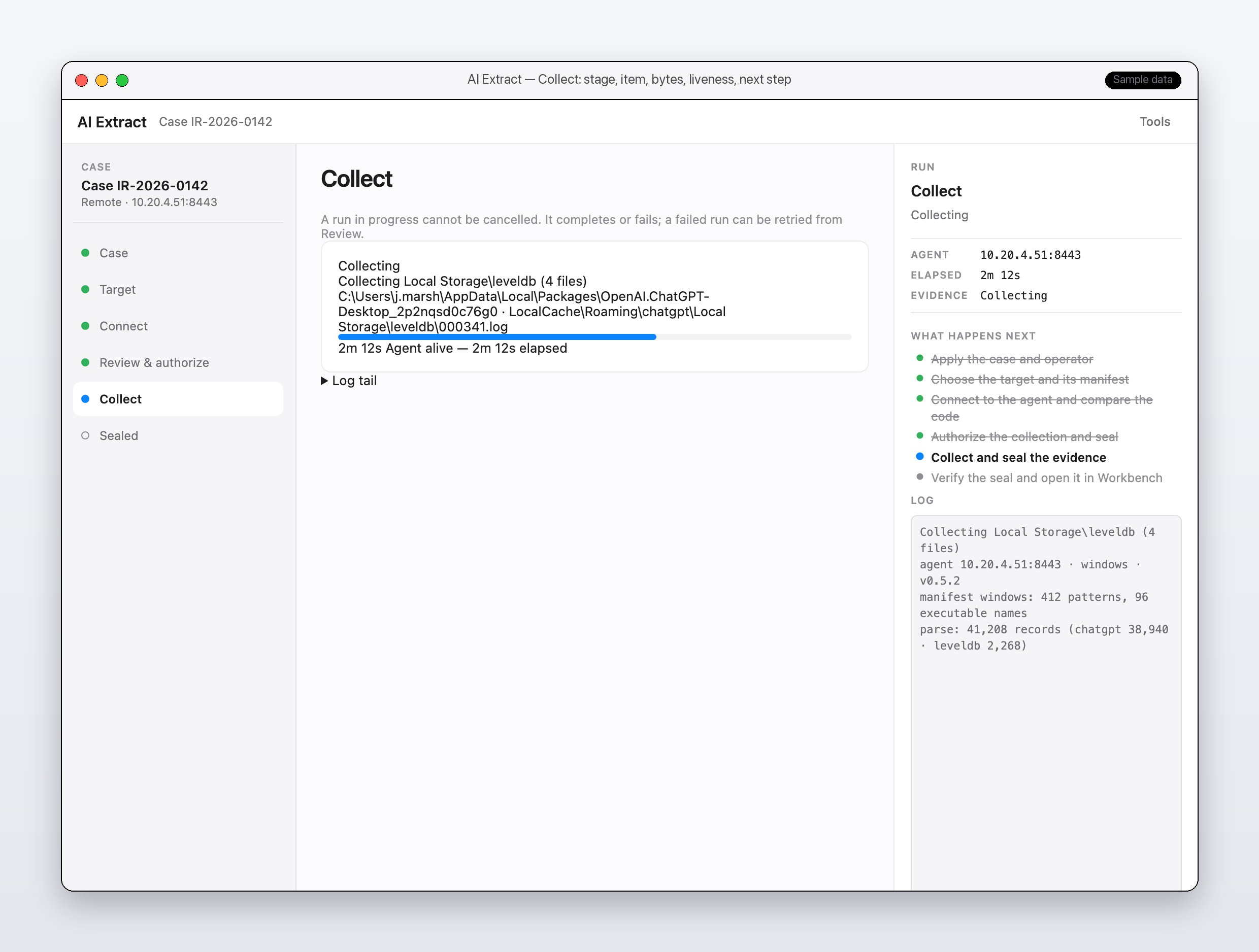
Before anything is collected, you enter your name as the operator and the case ID. Both stay pinned at the top of the window, and both are recorded in the metadata of the evidence container, a single sealed .aex file. The name is typed by the operator and is not independently verified, so it records who said they did the work, not proof of identity. The stepper down the left side takes you through six stages: Case, Target, Connect, Review & authorize, Collect, and Sealed. At the Target stage you choose where the evidence lives: the live machine, a folder, a forensic image, or a remote system.
This screenshot catches a run in progress against a remote Windows machine. The center panel shows what the collector is doing right now, which is reading four files from the ChatGPT Desktop LevelDB store (LevelDB is the small key-value database many apps use to keep their data on disk, and it is where ChatGPT Desktop keeps its conversation state). It also shows the run has lasted 2 minutes 12 seconds and that the remote agent is still alive. The “What happens next” list shows the whole run, with the finished steps ticked off and the current one, collect and seal, in progress.
The log records what the collector loaded and what it found. It started with a manifest, which is simply the list of places the collector knows to look: 412 source patterns and 96 executable names for Windows. Parsing then recovered 41,208 records, 38,940 from the ChatGPT parser and 2,268 from the LevelDB parser. The same 41,208 figure appears on the ChatGPT Desktop card in Step 2, where it sits inside the case’s larger total.
Every file passes through a hashing reader as it is copied, so a SHA-256 fingerprint is calculated at the moment of collection. If that fingerprint still matches months later, the collected copy has not changed since you took it.
A run in progress cannot be cancelled. It completes or it fails, and a failed run can be retried from Review.
Step 2: Read the case overview
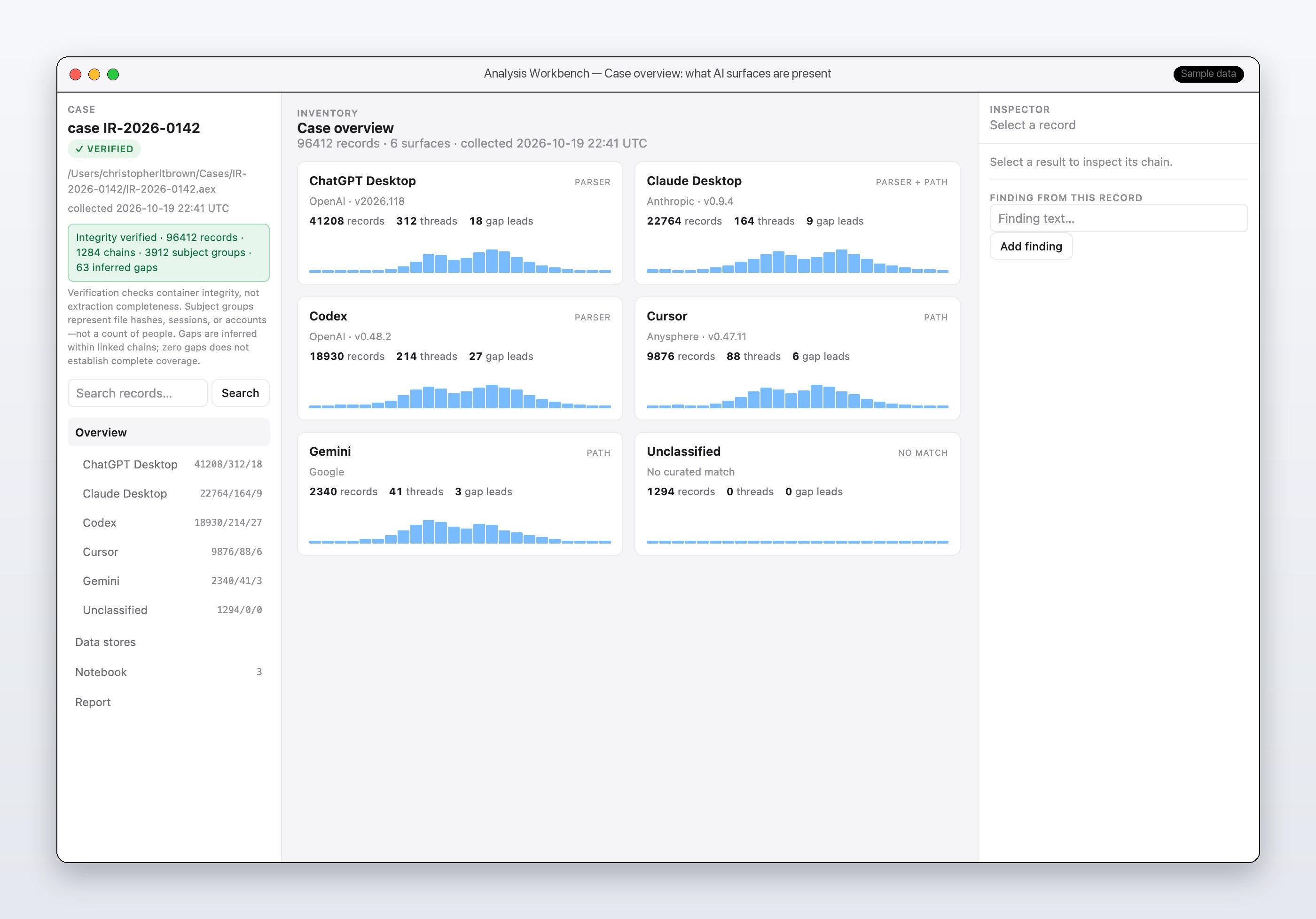
Once the container is sealed, it opens in the Analysis Workbench, and the Workbench verifies it before it shows you anything else. The green VERIFIED badge at the top means the container’s hashes check out. The heading, Case overview, carries a one-line summary: 96,412 records across six surfaces, collected 2026-10-19 at 22:41 UTC.
A surface is one AI product or tool. This case has ChatGPT Desktop, Claude Desktop, Codex, Cursor, Gemini, and an Unclassified group for records with no curated match. Each card shows the vendor, the app version where one was identified, the record count, the number of threads (a thread is one conversation or session), and the number of gap leads, which Step 3 explains. The PARSER and PATH tags on the cards tell you whether the surface was identified by a dedicated parser, by where its files were found, or both.
The Case panel on the left holds the integrity box. It reads: Integrity verified, 96,412 records, 1,284 chains, 3,912 subject groups, and 63 inferred gaps. A chain is one linked sequence of records, and a subject group collects records that share an identity, such as a file hash, a session, or an account. Directly under that box are three caveats, and I would read them before quoting any number from this screen. Verification checks container integrity, not extraction completeness. A subject group is not a count of people. And gaps are inferred only inside chains that were already linked, so zero gaps does not establish complete coverage.
Step 3: Follow a chain
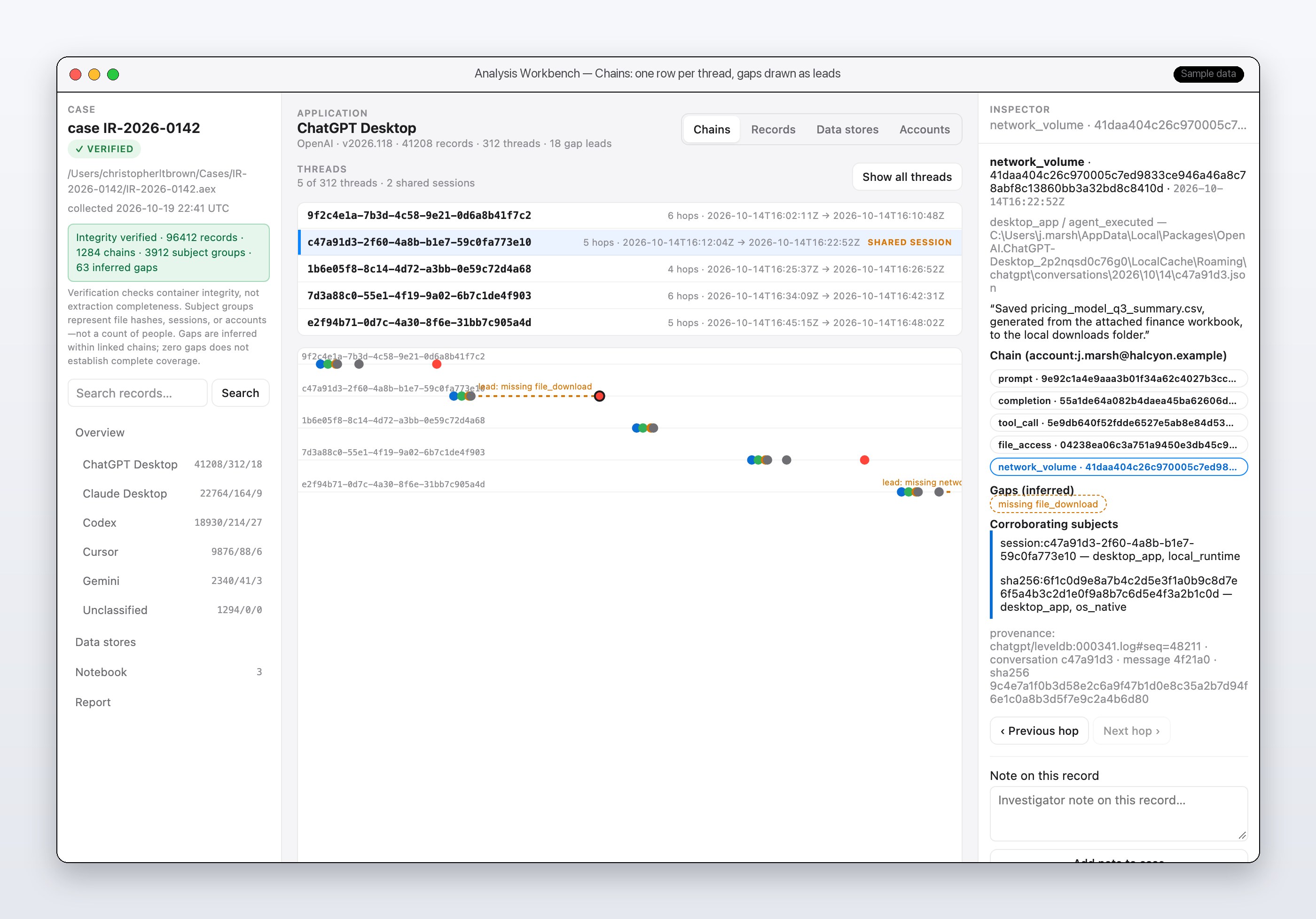
A single record rarely tells the story. A chain strings together the records from one conversation in the order they happened: the prompt, the completion (the assistant’s reply), any tool call, any file access, any file download, and any network volume (a record of data moving over the network). Each of those records is a hop. The Chains view draws one thread per row. The list on the left shows five of the 312 ChatGPT Desktop threads, each with its hop count and time span, and it marks the threads that belong to a shared session.
Select a thread and the inspector on the right lays out its ordered hops and the account behind it, here j.marsh@halcyon.example. Use the Previous hop and Next hop buttons to step through the chain one record at a time.
The inspector also lists any gap. A gap appears when a chain is missing a hop it would normally have. In this screenshot the selected chain has a file_access hop and a network_volume hop but no file_download hop, so the inspector lists “missing file_download.” Treat a gap as a lead. It tells you where to look in other sources, and it does not prove that something did or did not happen.
Below the gaps are the corroborating subjects, meaning the same session or file hash turning up in independent artifact classes. When two unrelated sources agree, the finding is stronger. The provenance pointer then tells you where the record came from. Provenance is the record’s origin, here the exact LevelDB log file and sequence number (chatgpt/leveldb:000341.log, seq 48211 in this sample). A second examiner can use it to find the same record in the sealed container.
Step 4: Work the records
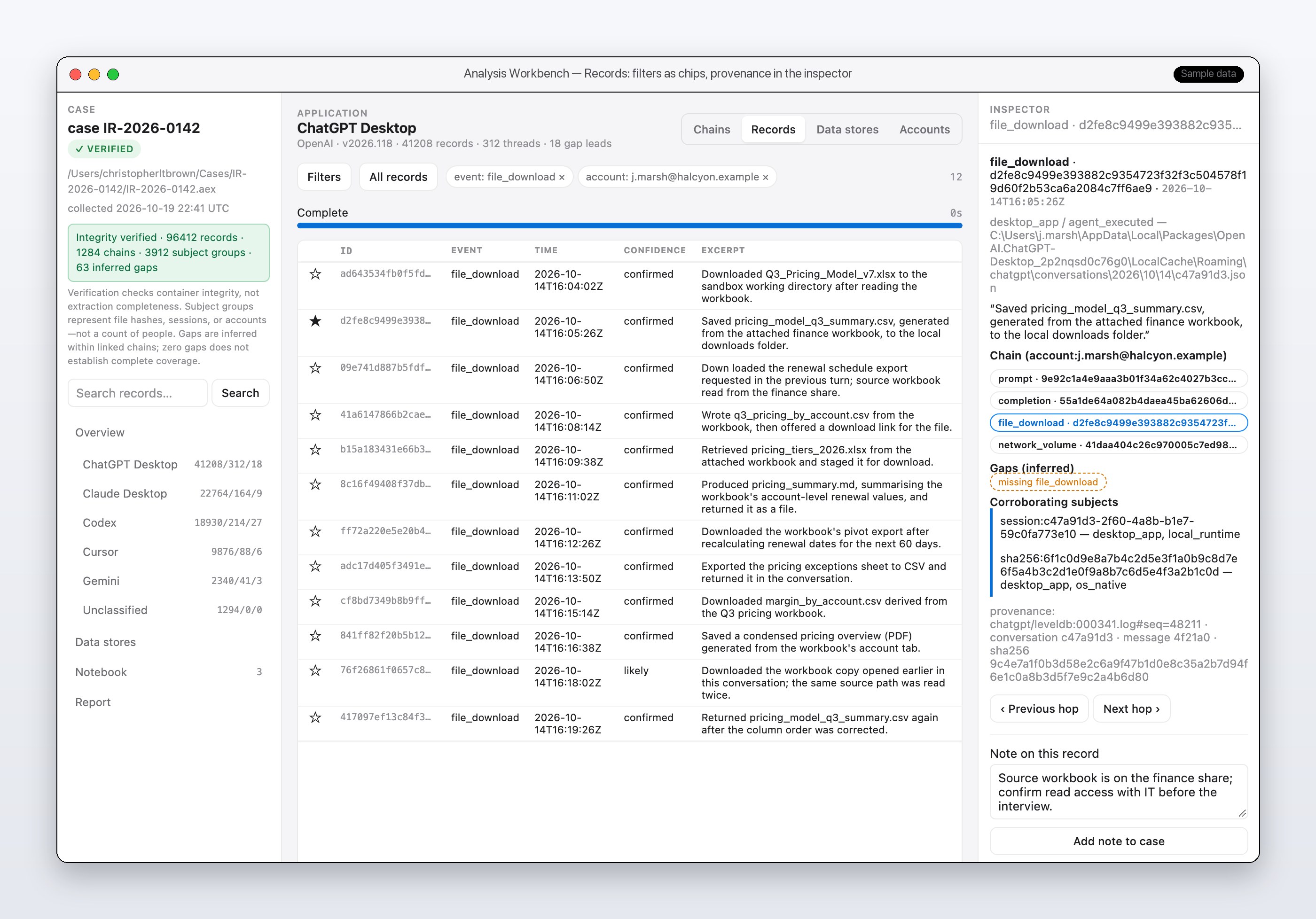
Records is the flat, searchable table that sits underneath the chains. Filters appear as chips above the table. Two are active here, event: file_download and account: j.marsh@halcyon.example, which narrows the case to 12 rows. Each row has an artifact ID, an event type, a UTC timestamp, a confidence label, and an excerpt of the recovered text.
Eleven of the 12 rows read confirmed and one reads likely. A likely row is weaker evidence than a confirmed one, so say so in your report.
Select a row and its inspector opens. It shows the path of the source file on the examined machine, the recovered text in quotation marks, the chain the record belongs to, and its provenance pointer. At the bottom is a note field. A note cites the record by artifact ID instead of copying its content. That keeps your findings tied to the evidence and lets a second examiner reproduce them against the same container.
Step 5: Other evidence sources and the remote agent
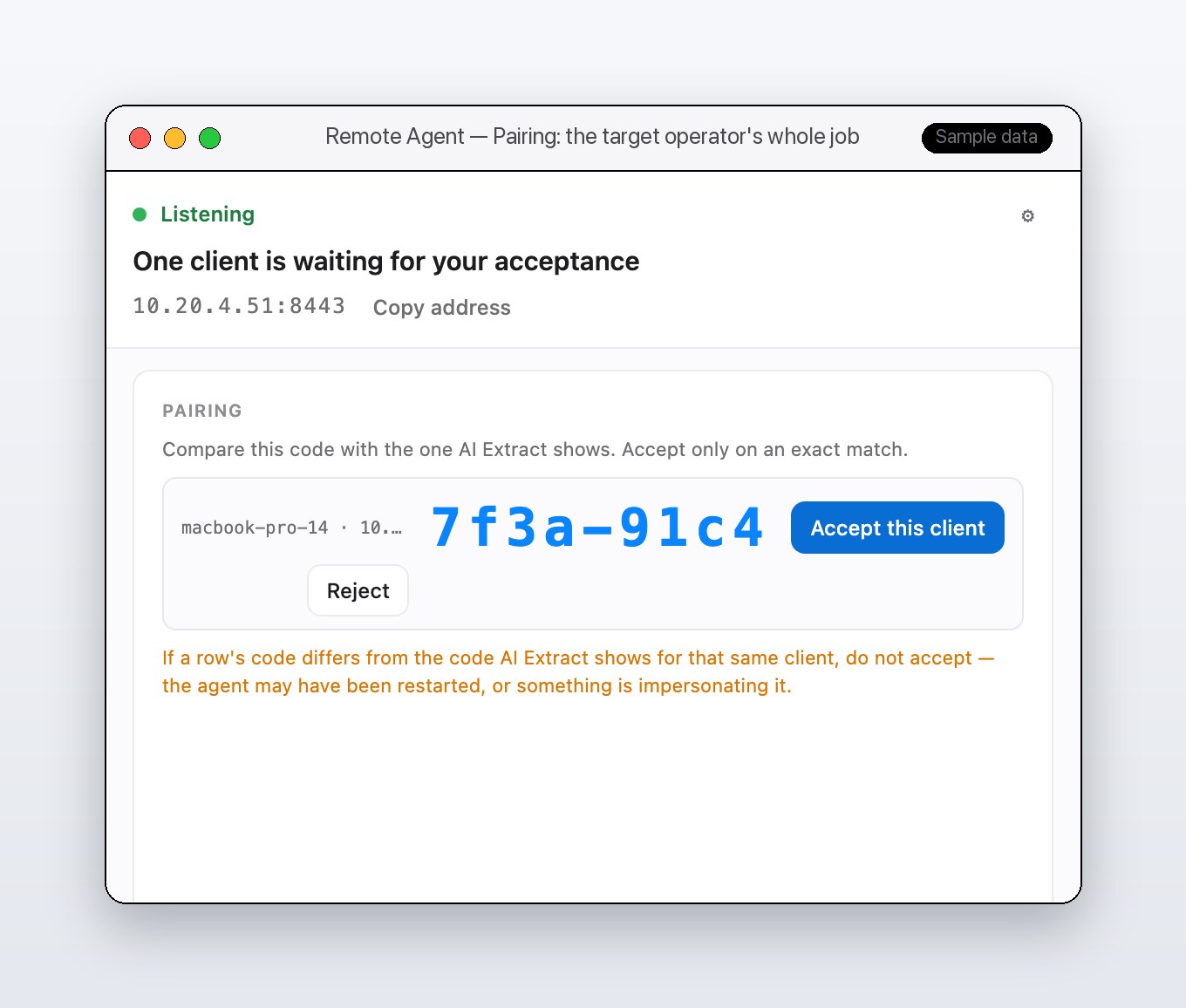
You do not need a live machine to use AI Extract. It collects from a wide array of forensic image formats (E01/EWF, AFF4, AFF4-Logical, raw dd, QCOW2, Parallels .pvm, .hdd, and .hds disks, plain or expanding, and .macvm bundles), from folders, and from the remote agent. Images are always opened read-only, so a dead drive can be examined without touching the original. Whichever route you take, the evidence ends up in the same sealed container.
This screenshot shows the target side of a remote collection. The agent shows a green Listening status and its own address. A message tells the operator that one client is waiting for acceptance, and a pairing code appears beside it.
The operator compares that code with the one AI Extract displays and accepts only on an exact match. If the codes differ, they reject the client. See Collecting from a remote system above for what that comparison is actually protecting against.
Where this goes next
The pipeline runs end to end today (collect, parse, validate, timestamp, correlate, report, seal, verify) across all three platforms. What is scoped but not yet built is listed honestly rather than left for someone to discover the hard way. The largest open gap is cloud and compliance-platform ingestion, since more assistants now keep conversation history server-side rather than on disk: the OpenAI Compliance Platform, Microsoft Purview Copilot data, and M365 eDiscovery holds. Behind that sits deeper Linux parser coverage and a few provenance features, including reading C2PA content credentials off recovered media. None of it is a promise. It is a public account of what is next, not what is done.
AI Extract is a private, invite-only codebase at the moment, available by request to qualified organizations and examiners. If you are working an AI-activity examination, or building an AI governance program that needs records that can survive scrutiny, get in touch.